
Kaleidoscope Effect
Turn any photo into a kaleidoscope: reflect a piece of the image in two, three or four mirrors, like in a real kaleidoscope.
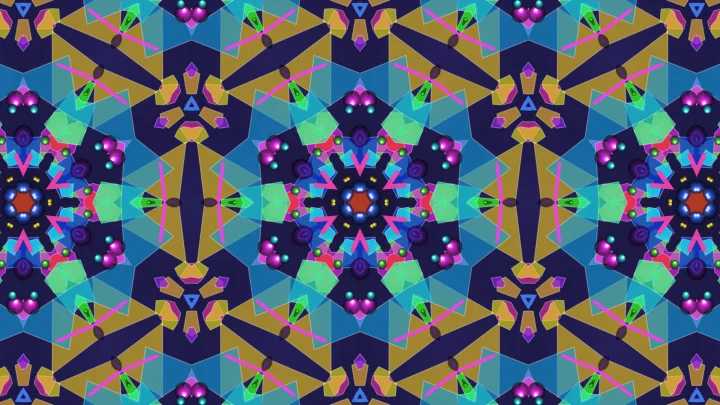
This free online kaleidoscope maker works like the real toy. A small piece of your image is placed between mirrors, and the mirrors reflect it again and again. With two mirrors, the reflections go around the center and make a round mandala, with as many copies as you want. With three mirrors in a triangle, or four mirrors in a square, the reflections never end, and they fill the whole image with a repeating pattern.
Drag the piece over your image to choose what the mirrors reflect, turn it, and watch the pattern change, exactly as when you turn the tube of a kaleidoscope. Download the result as a PNG, JPG or WebP image in high resolution, or make it move with the Kaleidoscope Animation Generator.
Everything runs directly in your browser, on your graphics card. No image is uploaded to a server, and nothing needs to be installed.
Drop your image here
How to make a kaleidoscope from a photo?
- Upload your image - Any photo works, but colorful images with lots of small details (flowers, fruit, city lights, fabrics, stained glass) give the most striking kaleidoscopes. You can also paste an image with Ctrl+V, or click "Try it with a sample image".
- Choose the mirrors - "Circle" makes a round mandala around the center, with the number of copies you choose. The triangles and the square repeat the pattern over the whole image, which is great for backgrounds and textures.
- Choose the piece of the image - Drag the bright piece over the small copy of your image to choose what the mirrors reflect, and drag its blue handle to turn it and change its size. You can also drag on the result to turn the kaleidoscope, or click "Shake" for a random piece.
- Set the size of the result - The download is square by default. Use "Same proportions as the image" for a wallpaper, or type any width and height.
- Download the kaleidoscope - Choose PNG, JPG or WebP and click "Download". To make it move, use the Kaleidoscope Animation Generator.
Options
| Field | Description | ||||||||||||
|---|---|---|---|---|---|---|---|---|---|---|---|---|---|
| Kaleidoscope | How the mirrors are placed, as in the different kinds of real kaleidoscopes.
| ||||||||||||
| Mirror every other copy | Only for the circle. When it is on, each copy is the mirror image of its neighbours, as in a real kaleidoscope, and the copies join without any visible line. When it is off, the copies are only rotated around the center, like the blades of a fan, and any number of copies is possible. | ||||||||||||
| Number of copies | Only for the circle: how many times the piece appears around the center. The angle between the two mirrors is 360° divided by this number, so 8 copies means mirrors at 45°. With mirrors, the number of copies must be even, or the last copy would not match the first one. | ||||||||||||
| Pattern size | Only for the triangles and the square: the size of one tile of the pattern (its longest side), in percent of the shorter side of the result. Small values repeat the pattern many times. | ||||||||||||
| Rotation of the result | Turns the whole result around its center, in degrees. | ||||||||||||
| Round frame | Keeps only the circle in the middle of the result, like the view through the eyepiece of a kaleidoscope. The corners become transparent, or take the background color. | ||||||||||||
| Piece of the image | The part of the image that the mirrors reflect, shown in bright on a small copy of your image. For the circle it is a slice of a disc, with its point at the center of the kaleidoscope. Drag it to move it, and drag its blue handle to turn it and change its size. "Shake" picks a random piece. | ||||||||||||
| Position X and Y | Where the piece is on the image, in percent of its width and of its height. For the circle, it is the point of the slice. For the other shapes, it is the center of the triangle or of the square. | ||||||||||||
| Angle | Turns the piece on the image, in degrees. It is what changes when you turn a real kaleidoscope, and when you drag on the result. | ||||||||||||
| Size | The size of the piece, in percent of the shorter side of the image: the radius of the slice for the circle, the longest side for the other shapes. A small piece magnifies a small detail of the image. | ||||||||||||
| Outside of the image | What the mirrors reflect where the piece goes beyond the edges of the image: the image mirrored at its edges (no visible seam), its edge pixels stretched, the image repeated, or nothing (transparent). | ||||||||||||
| Width and height | The size of the downloaded image, in pixels, up to 8192 × 8192. The preview shows the same result at a smaller size. | ||||||||||||
| Anti-aliasing | Computes several samples for each pixel and averages them. It smooths the edge of the round frame and the lines between rotated copies. The mirrored copies join smoothly without it. | ||||||||||||
| Transparent background | Shown when the result has empty parts (with the round frame, or with a transparent outside of the image). Turn it off to fill them with a color. JPG images have no transparency, so these parts become white, or take the background color. |
How does a kaleidoscope work?
A kaleidoscope is a tube with mirrors along its length, and a chamber with loose pieces of colored glass at the far end. Looking through it, you see the glass between the mirrors, and its reflections in every mirror. Each reflection is also reflected by the other mirrors, so a single piece of glass appears many times, in a symmetric pattern. Turning the tube moves the glass, and the whole pattern changes at once.
With two mirrors at an angle, the reflections go around the line where the mirrors meet. They only close the circle perfectly when the angle divides 180°: at 60° you see 6 copies of the piece, at 45° you see 8, at 30° you see 12. That's why this tool asks for an even number of copies when they are mirrored.
With three mirrors, the reflections never end: they fill the whole view, like an infinite tiling. For the copies to fit together without gaps or overlaps, every angle of the triangle must divide 180°, and only three triangles do it: 60°-60°-60°, 45°-45°-90° and 30°-60°-90°. These are exactly the triangles this tool offers. The same is true of the square with four mirrors, whose angles are all 90°.
To draw the kaleidoscope, the tool computes, for each pixel of the result, which point of the piece it shows. It "folds" the pixel back between the mirrors: as long as the pixel is on the wrong side of a mirror, it is reflected across that mirror, as light would be. That gives the point of the piece, and the color of the image at that point is the color of the pixel. Your graphics card does this for millions of pixels at once, which is why the result changes instantly while you drag the piece.
Frequently Asked Questions (FAQ)
Is this kaleidoscope maker free to use?Yes, this tool is 100% free and works directly in your browser, with no installation, no sign-up and no watermark.
Are my images uploaded to a server?No. The kaleidoscope is drawn by your own browser, on your graphics card, and the image never leaves your computer.
How do I make a mandala from a photo?Choose "Circle (2 mirrors)", turn on the round frame, and try 8 to 16 copies. Then move and turn the piece until the pattern looks good. Pieces on the edge between two different colors or textures usually give the most interesting mandalas.
How do I make a seamless pattern or a background?Choose one of the triangles or the square: their patterns repeat in every direction, like a tiling. Set the pattern size to choose how many times it repeats, and the width and height to the size of your screen or of your design.
Why do I see lines between the copies?When "Mirror every other copy" is off, the copies are only rotated, so the two sides of a copy don't match its neighbours, as in a real kaleidoscope made of something other than mirrors. Turn it on for copies that join without any line. Anti-aliasing smooths the lines that remain.
Why is my result blurry?A small piece shows a small part of the image, which is magnified to fill the copies. Use a larger piece, a smaller result, or an image with a higher resolution.
Can I make an animated kaleidoscope?Yes. The Kaleidoscope Animation Generator has the same mirrors and turns, moves or zooms the piece of the image, and downloads a seamless loop as an animated GIF or a WebM video.
Related tools